10 Reasons Why I Still Use RSS Feeds

I still use RSS Feeds for reading my favorite blogs, as inspiration for writing my own blog, for staying up to date with PubMed, collecting information on several searches and from several sources, and for monitoring my blog and tweets. For reading RSS Feeds I use Google Reader because it’s an online reader which I can read from any PC as long as there’s an Internet connection, it’s fast to navigate with keyboard shortcuts, you can share your content, and create your own tags.
Other google reader fans have switched to twitter to stay up to date especially since twitter has lists, for a short comparison of gReader and twitter read Scobleizer: Why I don’t use Greader anymore. I think twitter and google reader for rss feeds are two different apps, both with their own advantages and disadvantages. If you listent o the experts at this white label seo company, for staying up to date people prefer rss feeds, searches on twitter deliver a lot of non information and you’ll always have to check the website to see if it’s worth your while.
Why I favor RSS Feeds
- It gives you control over all the information
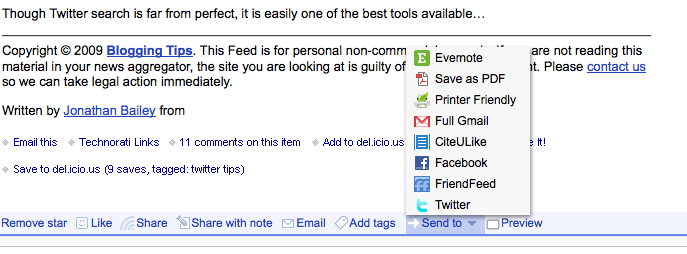
- You can share your information not only with those who follow you on your GReader but also via the so called send to
- With a RSS feed reader all your information gathers in one place
- With keyboard shortcuts it’s fast to go through all your feeds
- Especially e-mail alerts are a pain, they fill up your inbox. They usually sit there until you direct them to dev0 or the waste bin
- RSS feeds are spam free
- Updates are in real time
- Privacy is better controllable than with twitter let alone facebook
- You can read them everywhere with online connection, such as your mobile, iPad, iPhone, netbook, you name it
- You can even make a hierarchical structure
There’s nothing better than RSS Feeds especially in combination with GReader, more tips and tricks
May 11, 2010 @ 8:54 am
Totally agree, I have 300+ RSS feeds pouring their information into my reader every day, but I no longer use GReader in its native state, I use the Feedly addon for Firefox, it turns GReader into a controllable magazine of RSS feeds as well as improving search capabilities.
May 11, 2010 @ 9:27 am
I also use RSS feeds and and definitely think they make my life easier. All my google alerts and favorite news sources all show up in one spot. I don’t have the time to visit each website individually and scroll through each page. I currently use newsfire, but I’ll have to check GReader out!
May 11, 2010 @ 9:46 pm
Will give feedly a try, looks promising, thanks
May 12, 2010 @ 1:38 am
Agree that RSS sill offers a lot of advantages.
But I myself have been using RSS less and less. In part because I’ve created Twitter lists to replace my rss feeds and use different clients to view the content.
But you’re right, rss is still a very helpful tool.
Phil
May 12, 2010 @ 3:02 am
The only problem I have with RSS readers is how easy it is to add more feeds. I find it quickly gets to the point that your stream is diluted.
I subscribe either with their email subscription or use http://feedmyinbox.com to convert the RSS feed to an email.
Having one stream and inbox forces me to subscribe only to high yield content.
Bibliothekarisch.de » Blog Archive » links for 2010-05-11
May 12, 2010 @ 8:07 am
[…] 10 Reasons Why I Still Use RSS Feeds | Dr Shock MD PhD RT @notinmy, @bibmanblog & @laikas: Reading 10 Reasons Why I Still Use RSS Feeds by @DrShock http://bit.ly/92ug3B – 1 reason: less spam 😉 (tags: twitter_automatisch) […]
May 12, 2010 @ 12:23 pm
How do you setup a successful RSS feed?
advice?
May 13, 2010 @ 11:23 am
Twitter lists is an excellent feature although I find it hard to judge the relevance of most links due to the short descriptions and from experience a lot of these tweets are not on the subject. It takes me more time to scan the tweets than the RSS feeds. But maybe you’ve got an efficient strategy.
Take care walter
May 13, 2010 @ 11:25 am
I hate email subscriptions because they clutter my inbox, but than I’ve a lot of daily emails. I use different labels, label A for very important posts, must reads and subsequently label B,C,D for less important feeds. Take care Walter
May 13, 2010 @ 11:28 am
Not sure wath you mean but a search in google delivered this:
http://www.pcstats.com/articleview.cfm?articleID=1771
Removed your email adress for spam reasons 😉
May 13, 2010 @ 10:43 pm
Agreed. Twitter (and lists) is great for finding new blogs. (I landed here from a Tweet to a blog post may by David Bradley who I follow on Twitter and in Reader.) And I also sometimes see posts there before I see them in Google Reader (as happened today).
But while Twitter offers serendipity, Google Reader gives me a consistent way to keep track of the blogs I follow regularly. I can organize my feeds into topics such as marketing, technology, Cleveland, arts & culture, etc. then browse these areas depending on my need at any given time. I use Reader for personal enrichment (to keep up with the latest news and info in my field), for content curation (to find articles I should share on Twitter, Facebook, etc.) and for monitoring my brand (and client’s brands) by tracking feeds from searches made in Google Blog Search, Twitter search, Yahoo news search, etc.
For these tasks I find the consistency of reader to be invaluable. And like you I also like the option to share items to my reader sharing peeps, Buzz, etc.
It’s funny, I often hear that RSS is dying, yet it’s still an incredibly powerful tool that many people haven’t even begun to explore.